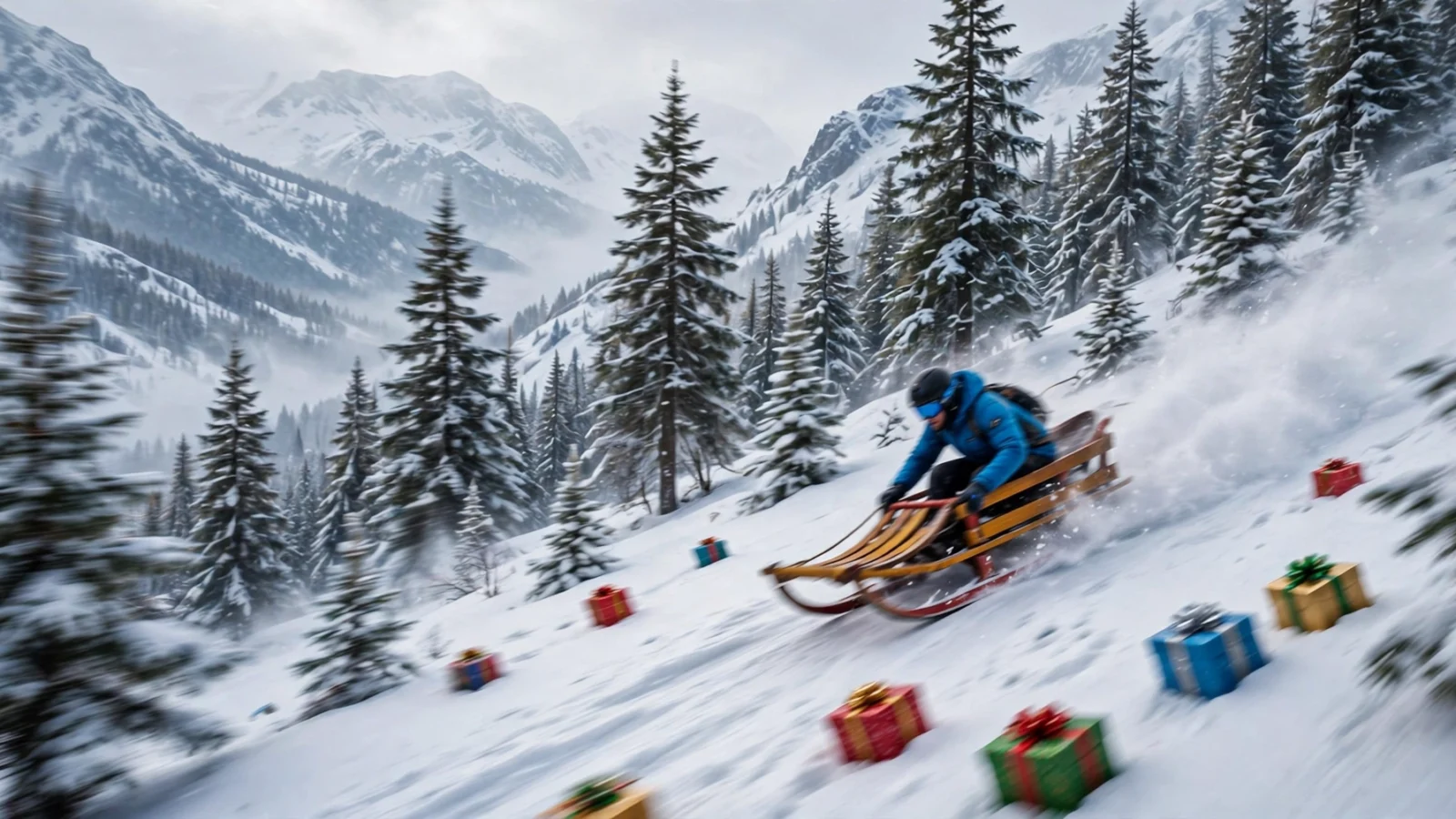
Snow Rider 3D is a fast and addictive downhill sledging game. You ride a sled down an endless snowy mountain, steering between trees, rocks, and snowmen while grabbing gifts and stars along the way. One crash ends the run, so every descent is a test of focus and reflexes. This guide covers the controls and the techniques that will keep you riding longer. For a completely different challenge, see our Retro Bowl guide when you are done here.
Last updated: October 2026
Why Play the Unblocked Version?
Snow Rider 3D is a perfect fit for short breaks. Runs last a minute or two at most — one crash ends the run — so it is easy to squeeze in a quick descent between classes and put the game down without losing anything you need to track. The unblocked version loads in a browser tab on networks where gaming sites are usually filtered, and there is nothing to download or install, which matters on locked-down school Chromebooks.
It is also light on hardware. The game uses simple 3D graphics and only a handful of controls, so even an older Chromebook runs it smoothly. The controls are just the arrow keys (or A and D) plus the spacebar, so there is no learning curve on a keyboard you already use every day.
One honest note: “unblocked” does not mean it works everywhere. School filters differ, and some networks block the game while others allow it. If it does not load on your network, respect your school’s rules rather than trying to get around them.
How to Play Snow Rider 3D Unblocked
The concept is simple: your sled picks up speed on its own as you head downhill. Your job is to steer left and right to thread through gaps in the obstacles. Hitting a tree, rock, or snowman ends your run, so smooth steering matters more than raw speed.
Scattered across the slopes are gifts and stars. Collecting them boosts your score, and ramps let you jump over obstacles and grab out-of-reach pickups. Your distance and score are tracked each run, so every attempt is a chance to beat your personal best.
Beginner’s Walkthrough: Your First Game
Starting Snow Rider 3D for the first time? Here is exactly what to do, step by step.
- Start your first run and let the sled pick up speed. Do not touch the controls for the first second or two — just feel the pace of the descent.
- Steer with small taps of the Left and Right arrow keys (or A and D). Gentle taps change your line a little; holding the key sends you swerving.
- Keep your eyes on the upper part of the screen. Trees, rocks, and snowmen appear at the top first, so watching there gives you the most time to react.
- Thread through the gaps between obstacles. After each dodge, drift back toward the center of the slope so you have room to react on both sides.
- Collect gifts and stars that sit on your natural line. Do not swerve for risky pickups on your first runs — survival teaches you more than one gift does.
- Steer onto ramps when you see them. A ramp launches you into the air, carrying you over obstacles and toward pickups you could not otherwise reach.
- Press the Spacebar to jump over a tree or rock you cannot steer around in time. The jump is your get-out-of-jail card — use it the moment a crash looks unavoidable.
- When you crash (you will), check your distance and start again. Runs are short, so every attempt is a quick lesson. Your goal each run is simply to beat your last distance.
Snow Rider 3D Controls
The controls are deliberately simple, which makes the game easy to learn but hard to master.
| Action | Key or Input |
|---|---|
| Steer left | Left arrow key or A |
| Steer right | Right arrow key or D |
| Jump | Spacebar |
| Steer on mobile | Swipe left and right |
| Jump on mobile | Tap the jump button |
Tips and Tricks for Snow Rider 3D
- Make small steering adjustments. Big swerves send you straight into obstacles. Gentle taps keep your line smooth and predictable.
- Stay near the center of the slope. The middle gives you the most room to react when obstacles appear on either side.
- Look ahead, not at your sled. Watch the upper part of the screen so you can plan your path through the next cluster of obstacles.
- Use ramps to jump over trouble. A well-timed jump clears trees and rocks that would otherwise end your run, and often lines up gift pickups.
- Do not chase every gift. Risky detours for a single gift usually end the run. Take the pickups that sit on your natural line.
- Stay calm at high speed. The sled gets faster the longer you survive. Keep your movements small and trust your line.
- Learn from each crash. Runs are short, so retrying is cheap. Each attempt teaches you the obstacle patterns a little better.
Advanced Tips & Strategies
Once the basics are second nature, these are the habits that separate long runs from short ones:
- Plan two obstacle clusters ahead, not one. At low speed, reacting to the next tree is enough. At high speed, it is not. Train your eyes to read the cluster after the one you are steering through — that way you never commit to a line that leads straight into a dead end.
- Jump late, not early. Pressing the Spacebar too soon means you land right on top of the obstacle you were trying to clear. Jump just before you reach it so you are still airborne when you pass over it and land safely on the other side.
- Use ramps deliberately. Ramps launch you over whole patches of trouble, so aim for them when the slope ahead looks crowded. But check where you will land — a ramp that throws you into a dense cluster is worse than steering through it on the ground.
- Steer in taps, never holds. A held arrow key sends the sled swerving across the slope, which almost always ends in a crash. Short, repeated taps give you fine control and let you correct your line between taps.
- Treat gifts as bonuses, not goals. Gifts and stars add to your score, but distance dwarfs them over a long run. Take pickups that sit on your natural line and ignore the ones that demand a risky swerve.
- Shrink your inputs as speed grows. The sled gets faster the longer you survive, and the same key tap moves you proportionally more at high speed. Late in a run, think in tiny taps — your early-run muscle memory will oversteer.
- Study your crashes. Every crash has a cause: an over-steer, a late jump, or tunnel vision on a gift. If the same kind of crash keeps ending your runs, fix that one habit and your personal best will jump further than any lucky run could.
Common Mistakes to Avoid
These are the habits that end most runs early. Drop them and your scores will climb:
- Holding the arrow key instead of tapping. It is the single most common mistake. A held key sends the sled into a wide swerve that is almost impossible to recover from — tap, release, and tap again.
- Staring at the sled instead of looking ahead. If your eyes stay on your sled, every obstacle is a surprise. Watch the upper part of the screen so trees, rocks, and snowmen stop surprising you.
- Chasing every gift. A single gift is never worth a crash. Swerve for pickups only when they sit on or near your line — distance is what really grows your score.
- Never jumping. The Spacebar is a get-out-of-jail card, yet many players forget it exists. If a crash looks unavoidable, jump first and regret never — the worst outcome is the same run ending a second later.
- Panicking at high speed. As the sled gets faster, the instinct is to make bigger, faster movements. Do the opposite: keep your taps small, trust your line, and let the speed work for you.
Frequently Asked Questions
Is Snow Rider 3D free?
Yes. Snow Rider 3D is free to play in your browser with no download and no account required.
Can I play Snow Rider 3D at school?
Yes. The unblocked version loads in a browser tab and works on most school and work networks where gaming sites are restricted.
How do I get better at Snow Rider 3D?
Focus on smooth, small steering movements and looking ahead at upcoming obstacles. Use jumps to clear danger, stay near the center of the slope, and resist chasing risky gifts. Short, frequent runs build reflexes fast.
How do I jump in Snow Rider 3D?
Press the Spacebar on a keyboard or tap the jump button on mobile. Ramps also launch you into the air, which is great for clearing obstacles and reaching gifts.
Does Snow Rider 3D work on mobile?
Yes. The game supports touch controls, so you can steer by swiping and jump with a tap on phones and tablets.
How far can you go in Snow Rider 3D?
There is no finish line — the slope is endless. A crash ends the run, and your distance is your score, so every run is really a contest against your personal best.
Do the gifts and stars actually do anything?
They add to your score. Treat them as a bonus, not the goal: distance matters far more over a long run, so only grab pickups that sit on your natural line.
Can I play Snow Rider 3D on a school Chromebook?
Yes. The unblocked version runs in a browser tab with just the arrow keys (or A and D) and the Spacebar. It is light enough to run smoothly on older Chromebooks too.
Why do I keep crashing once I get going fast?
The sled gets faster the longer you survive, so your reaction window keeps shrinking. Small taps, eyes on the upper part of the screen, and staying calm are what carry you through the fast stretch — do not panic.
More Game Guides
Ready for a new challenge? Check out our other game guides:
- How to Play 1v1.LOL Unblocked: Controls, Tips and Guide
- How to Play Cookie Clicker Unblocked: Beginner’s Guide and Tips
- How to Play Retro Bowl Unblocked: Guide and Tips
Or browse the full collection of free unblocked games on Unbanned G+.

3 thoughts on “How to Play Snow Rider 3D Unblocked: Controls & Tips”